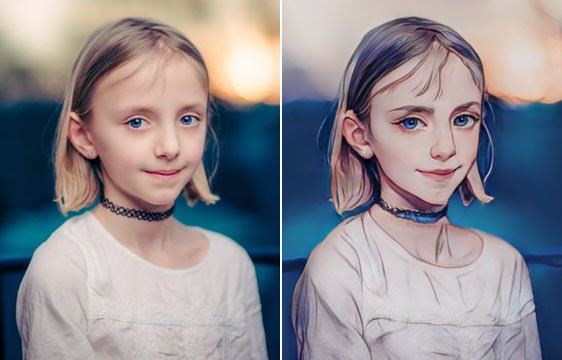
Step-by-Step: How to Use AI for Photo to Cartoon Conversions
The rise of artificial intelligence (AI) has brought with it a wave of creative possibilities, and one particularly exciting application is the ability to transform photos into cartoons. Gone are the days of painstakingly hand-drawing outlines and shading; with AI tools, you can now achieve stunning cartoon conversions in a matter of minutes.
Whether you’re a professional artist seeking new tools, a casual photographer experimenting with different styles, or just someone who wants a fun and unique way to personalize your photos, AI photo-to-cartoon conversion is definitely worth exploring. In this step-by-step guide, we’ll walk you through the process, using some of the most popular AI tools available.
Step 1: Choose Your AI Tool
A plethora of AI tools can convert your photos into cartoons, each with its strengths and weaknesses. Here are a few of the most popular options:
- Photoshop Beta: Adobe’s popular image editing software recently introduced a powerful AI-powered “Neural Filters” feature, including a “Cartoonizer” filter that delivers impressive results.
- Remini: This mobile app specializes in photo enhancement and restoration, but it also boasts an effective “Cartoon” mode that adds a playful, anime-inspired touch to your photos.
- Picsart: This all-in-one photo editing app offers a user-friendly “Cartoon Effect” tool with various customizable options for line thickness, color saturation, and more.
- Deep Dream Generator: This online platform goes beyond simple cartoon conversions, offering a range of artistic filters and effects that can transform your photos into surreal, dreamlike landscapes.
- Lensa AI: This AI portrait app excels at creating stylized renditions of your portrait photos, including cartoon looks with bold lines and vibrant colors.
The best tool for you will depend on your specific needs and preferences. Consider factors like ease of use, available features, output quality, and price when making your decision.
Step 2: Prepare Your Photo
Not all photos are created equal when it comes to AI cartoon conversions. For optimal results, choose a photo with good lighting, clear details, and a well-defined subject. Avoid blurry or low-resolution images, as these can lead to grainy or inaccurate cartoon renditions.
Step 3: Upload and Process Your Photo
Once you’ve chosen your tool and prepared your photo, it’s time to get started! Most AI tools have simple interfaces for uploading your photo and selecting the desired cartoon effect. Some tools, like Photoshop Beta, offer additional customization options, such as adjusting the intensity of the effect or fine-tuning specific features like eyes and hair.
Step 4: Refine and Enhance (Optional)
Depending on the tool you use and your desired outcome, you may want to further refine your cartoonized photo. For instance, you could use additional image editing tools to adjust the colors, add backgrounds, or even incorporate text or speech bubbles.
Step 5: Share and Enjoy!
Once you’re happy with your AI-powered cartoon creation, it’s time to share it with the world! Post your cartoonized photos on social media, print them out for a unique keepsake, or use them for creative projects like greeting cards or invitations.
Tips and Tricks for Success:
- Experiment with different AI tools and filters to find the one that best suits your style and vision.
- Don’t be afraid to play with the customization options to achieve the perfect cartoon look.
- Use high-quality photos for better results.
- Consider the lighting and composition of your photo when choosing a cartoon style.
- Have fun and be creative! AI photo-to-cartoon conversion is a powerful tool for unleashing your artistic imagination.
With its ease of use and stunning results, AI photo-to-cartoon conversion is an exciting technology that opens up a world of creative possibilities. So grab your favorite photos, choose your AI tool, and get ready to unleash your inner cartoonist!
Convert photo to cartoon with AI online free get offer